)
)
For agencies, professional services, consultancies, and any other client-based business, delivering great work is only half the job. The other half is working alongside your clients to provide exceptional experiences, stellar communication, and flexible collaboration - without sacrificing profitability or burning out your team.
It's a constant balancing act between ensuring client satisfaction (responsive communication, on-time delivery, quality work) and staying profitable (efficient resource use, accurate billing, controlled scope). To help you walk that tightrope, you need client management software. The right client management platform enables you to stay on top of deadlines across multiple clients and projects (see all client work in one dashboard), flexibly allocate your resources (balance team capacity across 5-20+ clients), and respond to last-minute changes with ease (reassign work, adjust timelines, communicate impacts), so you can profit from every client demand without chaos or overwork.
As a Content Marketing Manager at Teamwork.com, I've seen how proper client management transforms agency operations - from spending 40% of time on coordination overhead (status updates, hunting for information, client emails) to spending 15% or less, freeing up 25% more time for billable client work and improving profitability by 15-20%.
In this guide, we'll cover everything you need to know about client management software: what it is, why you need it, what to look for, and which tool is right for you. Read on to learn:
Client management software helps agencies and professional services teams oversee client relationships and deliver client work from one platform. It combines client operations (communication, approvals, collaboration) with project execution (tasks, timelines, resources, budgets) to manage the full client lifecycle - from onboarding through delivery and ongoing support.
Choose Teamwork.com ($9.99-$24.99/user/month) if you need project management + client operations with time tracking, resource management, budgets, and unlimited free client access - best for agencies managing 5-50+ clients.
Pick HubSpot (free or $20-$890/month) for CRM + marketing automation focused on lead generation and pipeline - best for sales-driven teams.
Use Keap ($249-$399/month) for small business CRM with automation - best for solopreneurs and small teams under 10.
Choose Semrush CRM (included with Semrush subscription) for SEO agency client management - best for SEO-focused agencies.
Pick Nimble ($24.90/user/month) for relationship management with social enrichment - best for solopreneurs and networkers.
Decision rule: delivering client work (projects, tasks, deliverables) = Teamwork.com; generating leads and sales = HubSpot or Keap; SEO-specific = Semrush CRM; relationship tracking = Nimble.
What is client management?
Client management is the process of overseeing and developing your client relationships to drive better results for both your clients (successful projects, clear communication, on-time delivery) and your business (profitability, efficiency, repeat business, referrals).
It's a simple term for a deceptively difficult task. As anyone who's ever worked with a particularly client-y client knows, there's a lot that goes into getting it right - balancing client satisfaction with team capacity, managing scope creep without damaging relationships, and maintaining profitability while delivering quality. In order to stay profitable and still deliver world-class service, you need to:
Effectively organize and manage projects (clear tasks, owners, deadlines, dependencies)
Accurately forecast how long work will take (estimate hours, compare actual vs estimated, improve scoping over time)
Foster collaboration between your team and theirs (shared workspace, comments, file sharing, approvals)
Outline (and meet) due dates and key project milestones (realistic timelines with buffer, proactive communication when delays occur)
Provide visibility into the status of tasks and deliverables (clients can see progress without asking for updates - reducing "what's the status?" emails by 70-80%)
Communicate clearly and openly (centralized communication, documented decisions, transparent progress)
Set reasonable expectations and clear boundaries (defined scope, change request process, response time SLAs)
This is where client management software comes in. Client management software is a digital tool or app that streamlines how you engage with clients throughout the project lifecycle (onboarding, planning, execution, delivery, support, renewal) and beyond. Industry-leading client management software (like Teamwork.com 👋) combines project management (tasks, timelines, resources, budgets) with client operations (communication, approvals, collaboration, visibility) to help you work together productively, so you can stay efficient (minimize coordination overhead), organized (centralized information), profitable (track time and budgets), and happy (balanced workloads, clear communication) - and build long-lasting client relationships that grow your business through repeat work and referrals.
)
6 benefits of client management software
Client management software is a game-changer for busy teams who want to be more efficient (reduce coordination overhead from 40% to 15% of time), optimize their resources (improve utilization from 60-65% to 75-85%), and win back more time for meaningful (and billable) work (increase billable percentage from 65-70% to 75-80%). Here are some of our favorite benefits of client management software for teams of all types - I've seen these improvements firsthand managing client work at Teamwork.com:
1. Simplify client management from beginning to end
Using a client management platform gives you full control and visibility over your team's workload (see all work across all clients in one dashboard), enabling you to effectively manage even the most complex projects (multi-month initiatives with 10+ people and dependencies) - and the most demanding clients (frequent changes, tight deadlines, high expectations).
See who's working on what for better capacity planning (visual timeline showing each person's scheduled work across all clients), understand which resources are available for your next project (people under 75% capacity with relevant skills), and balance major deadlines across multiple clients to avoid last-minute crunches (see when multiple client deadlines cluster in same week, redistribute work to spread load) that risk derailing your project timeline or burning out your team (people working 60+ hour weeks to meet overlapping deadlines).
)
2. Centralize all client communication
Have you ever missed a crucial client email because it was locked in a team member's inbox while they were on holiday or out sick - and the client is frustrated because no one responded for 3 days? Client management software breaks down information silos (individual email inboxes, private Slack DMs, local files) by centralizing all project communication in shared workspace, increasing alignment and transparency across team and client.
With all client communication - like feedback (comments on deliverables, approval decisions, change requests), project updates (status changes, milestone achievements, timeline adjustments), and approvals (sign-offs, version approvals, scope changes) - in one accessible place (shared project workspace, not individual inboxes), your team never has to waste time trawling through email threads (15-20 minutes per search) or looking for updates ("did the client approve this?"), and your client is confident their voice has been heard (all feedback documented, nothing lost in email, clear record of decisions). This centralization typically reduces client communication time by 30-40% and "where's that feedback?" confusion by 70-80%.
3. Streamline project scheduling and delivery
Get a big-picture view of how work is distributed across your agency or team (portfolio dashboard showing all client projects, resource allocation, upcoming deadlines) to identify opportunities (team members with capacity for new work, profitable clients to upsell, successful project patterns to replicate) - and potential issues (people at 120% capacity heading for burnout, projects at 90% budget with 60% work remaining, multiple client deadlines clustering in same week). Client management software helps keep your project schedule on track by enabling you to spot blockers in advance (dependencies not met, resources unavailable, client approvals delayed) and take corrective action before delays cascade.
Free up bandwidth and avoid burnout by reassigning tasks to underutilized teammates (see who's at 40-50% capacity vs 120%+, redistribute work to balance at 75-85% for everyone). Proactively identify when you need to add headcount (forecast shows capacity gap in Q3 - hire now to be ready) or have availability to take on new clients (team at 70% utilization = room for 10-15% more work without hiring), so you can maximize your utilization (target 75-85% for agencies) - and your profits (higher utilization = more billable hours = more revenue without proportional cost increase).
)
4. Organize your data for improved reporting and decision-making
Your client management software creates a single source of truth for all data about your projects (tasks, time, budgets, files, communication, decisions), making it easy for teammates, clients, and other stakeholders to quickly find the up-to-date information they need without hunting through email, Slack, or local files. According to McKinsey research, knowledge workers spend 28% of their workweek searching for information - centralized client management reduces this waste by 50-70%.
But don't stop there: use the data from previous projects to fuel your analysis and continuous improvement. Understand where previous projects went right (delivered on time and under budget, high client satisfaction, profitable) and less right (ran over timeline by 30%, exceeded budget by 20%, low profitability) to forecast how long similar projects will take (compare actual hours vs estimates, identify patterns like "blog posts take 5 hours not 3 hours estimated"), and get more accurate reports for both clients (show progress, budget status, upcoming milestones) and internal use (profitability by client, utilization by team member, project health across portfolio). This data-driven approach improves estimate accuracy by 15-25% over 6-12 months.
5. Collaborate with clients to build stronger long-term relationships
Invite clients into your client management software to boost collaboration (shared workspace, real-time visibility, contextual communication), build trust (transparency into progress, documented decisions, clear accountability), and strengthen relationships (partnership feeling vs vendor relationship). A user-friendly client management tool lets you create a true partnership without requiring them to undergo time-consuming training (clients productive within 30 minutes - just view projects, add comments, approve deliverables), so you and your clients can focus on what really matters: working together to get results (successful projects, business outcomes, mutual growth).
Client access typically reduces "what's the status?" emails by 70-80% (clients can see progress themselves without asking), improves approval speed from 2-3 days to same-day (clients review and approve in platform without email back-and-forth), and increases client satisfaction scores by 15-25% (transparency and collaboration improve perceived service quality).
Pro tip: Deliver a delightful onboarding experience every time by using a client onboarding checklist. Collect important documents (contracts, brand guidelines, access credentials), understand how each client likes to work (communication preferences, approval processes, meeting cadence), and help them get up and running quickly (set up their account, walk through platform, schedule kickoff), so you can build productive client relationships from day one - strong onboarding improves client retention by 20-30% according to industry research.
)
6. Save valuable time by automating tedious processes
Best-in-class client management platforms leverage automations, integrations, and AI to help you win back hours every week - typically 5-10 hours per person on repetitive admin work. Whether it's repeatable project management templates that cut out setup time (save 30-45 minutes per project setup by using templates with pre-configured tasks, subtasks, dependencies, and assignees), workflow automations that effortlessly scale your best practices (when task moves to Review, auto-assign to client and send notification - no manual work), or an AI assistant that improves your writing (generate project briefs, polish client communications, summarize meeting notes), the right client management software takes care of time-consuming, repetitive tasks so you don't have to. The result? More time for you to invest in creative work (strategy, design, content creation) and growing client relationships (relationship building, upselling, referral generation) - activities that drive revenue vs administrative overhead that doesn't.
Key features of client management software
To help you effectively manage your clients and your work (the dual challenge of client services - relationship management + project delivery), look out for these features as you consider your client management software options. Not all client management software is created equal - some focus on CRM (tracking leads and sales) without project management, others focus on project management without client-specific features. The best client management software combines both.
Client communication and approvals
With the right tool, you can do more than just manage clients - you can build real partnerships that lead to lasting client relationships (repeat business, referrals, upsells). To level up your client experience, try these three game-changers:
Special user license types let you bring clients directly into your platform without incurring extra costs for your team (unlimited free client users vs paying per seat for every client contact - saves hundreds monthly for agencies with 10-20 clients). With client users, you can give clients exactly as much (or as little) visibility as they need (view-only, comment-only, or edit permissions; access to their projects only, not other clients' work), and enable them to add items (create tasks, upload files, submit requests), complete tasks (mark deliverables as done, approve work), and communicate in context via comments and messages (feedback attached to specific tasks, not lost in email) for more efficient collaboration.
A dedicated hub for all proofs lets you manage the entire client review and approvals process from one central place (upload designs, documents, videos; collect feedback with visual markup; track approval status). Quickly see what still needs sign-off (pending approvals highlighted) and what's ready for next steps (approved items move to production). Create a record of all client feedback and previous file versions (version history showing all iterations, who uploaded when, what feedback was given) to keep everyone aligned and prevent "I thought we approved version 2" confusion. This typically cuts feedback cycles from 2-3 days (email back-and-forth) to same-day approvals.
A shared help desk for all incoming client queries (support tickets, change requests, questions) breaks down silos (individual email inboxes) and increases transparency (all team members see all client requests, not just the person who received the email). Centralize client communications to provide faster responses (average response time improves from 4-6 hours to under 2 hours with centralized ticketing) and more consistent experiences (any team member can respond with full context, not just the original recipient), and easily prioritize requests from key clients (tag VIP clients, set SLAs, route to senior team members automatically).
Resource management and capacity planning
Resource management (allocating people to projects, balancing workloads, tracking utilization) and capacity planning (forecasting future resource needs, identifying hiring gaps) go hand-in-hand with client management. After all, no client is going to be happy if their project is under-resourced (not enough people or wrong skills assigned, leading to delays or quality issues) or you end up pushing due dates because your team is over capacity (everyone at 120%+ utilization, no bandwidth for client's timeline). Similarly, knowing exactly which resources are at your disposal at any given moment (who's available, what skills they have, how much capacity they have) helps you understand if you can take on that last-minute client request (client wants to add 20 hours/week for 2 months starting next week) or if you need to push it out (team at 95% capacity, can't absorb more work without hiring or extending timeline).
Resource management features essential for client work: workload planner (visual timeline showing each person's scheduled work), utilization tracking (percentage of capacity used - target 75-85% for agencies), capacity forecasting (predict resource needs 3-6 months out), and skills matching (find people with relevant skills and availability). Without these features, you're guessing about capacity - leading to overcommitments (say yes when you should say no), underutilization (people at 40% capacity while you turn down work), or burnout (people at 120%+ capacity for extended periods).
"With Teamwork.com, we get more visibility over the team's capacity and resources available, as well as more visibility in terms of who owns a task and what exactly needs to be done."
~ Nicci Beacham, Project and Quality Manager, Liberty Marketing
Project management
Project management features (tasks, timelines, dependencies, milestones, Gantt charts, Kanban boards) are a must-have to help you plan, organize, and deliver client work from brief through delivery. By bringing project management (execution - tasks, deadlines, progress tracking) and client operations (relationship - communication, approvals, collaboration) into one seamless platform, you and your clients can collaborate effectively (work in shared workspace, see same information), communicate in context (feedback attached to specific tasks or deliverables, not scattered across email), and stay aligned (everyone sees current project status, upcoming deadlines, and recent decisions), resulting in a better client experience (transparency, responsiveness, professionalism). Look for a flexible tool that adapts to your (and your clients') preferred ways of working (multiple view options - Kanban, Gantt, list, table, calendar), so you can tailor your workspace to meet your needs (project managers use Gantt for planning, team members use Kanban for execution, clients use simple list view for status).
)
Budgeting
Understanding how many hours - and dollars - each task equates to is crucial for planning client projects and maintaining profitability. With time tracking features (timers, manual entries, timesheets), you can log team time (billable vs non-billable, actual hours vs estimated hours), improve project scoping (compare actuals vs estimates to improve future estimates by 15-25%), and get a clear record of how resources were spent across the project (time by person, by task type, by project phase - essential for client billing and profitability analysis). Identify at a glance when projects reach certain thresholds (budget alerts at 75% and 90% consumed) so there are no nasty surprises (for you or your clients - proactively communicate when approaching budget limits, request more budget or reduce scope before overruns occur) and ensure the books are always balanced, even for fluctuating retainers (track hours consumed vs hours remaining in retainer bank, forecast when client will exhaust hours, plan renewals or top-ups).
Automations and templates
Managing clients and keeping projects on track involves a lot of repetitive admin (project setup, task assignment, status updates, client notifications, approval requests, invoice generation). Now multiply this same level of care and attention by your total number of clients (5-20+ active clients simultaneously), and it's easy to see how automations can save your team hours every week - typically 5-10 hours per person on administrative overhead. Easily automate steps in your workflow (when task moves to Review, auto-assign to client and send notification; when project reaches 75% budget, alert project manager; when client approves deliverable, move to production and create next phase tasks) and instantly spin up projects from pre-made templates (save 30-45 minutes per project setup with templates containing pre-configured tasks, subtasks, dependencies, assignees, and due dates) to remove tedious admin tasks and keep projects running smoothly, freeing up more time for valuable client work (billable delivery) and relationship-building (strategic conversations, upselling, referral generation).
Reporting
With all your data in one powerful client management platform (tasks, time, budgets, resources, communication - not scattered across tools), you can get real-time insights on your project's health (on track, at risk, overdue), utilization (percentage of team capacity used - target 75-85% for agencies), and profitability (actual cost vs revenue = profit margin by project or client). See how your work is progressing against targets (actual hours vs budgeted hours, actual cost vs planned revenue, percentage complete vs percentage of timeline elapsed) to gauge if you're on-track or need to make adjustments (reallocate resources, adjust scope, extend timeline, request more budget). Then, analyze your data to understand which clients and projects were most profitable (rank clients by profit margin, identify profitable vs unprofitable project types), and use your learnings to better plan your work in the future (allocate more resources to profitable work, improve estimates for similar projects, renegotiate rates for unprofitable clients or project types).
)
Integrations
Whatever software you pick, make sure it integrates with the other tools you use every day - accounting (QuickBooks, Xero for syncing invoices and expenses), CRM (HubSpot, Salesforce for syncing deals and contacts), communication (Slack, Microsoft Teams for notifications and task creation), file storage (Google Drive, Dropbox for attaching files), and time tracking (if not built-in). Whether you're exporting invoices (sync time entries to QuickBooks for billing) or embedding a new website mockup into a task for review (attach Figma designs, preview in-platform), integrations help you sync your data (automatic updates between tools, no manual copy-paste) and streamline your workflows to deliver a seamless experience for your clients (everything connected, no information gaps, faster turnaround).
Prioritize native integrations (built by the vendor, more reliable, better support) over Zapier workarounds (third-party automation, can break, adds cost and complexity). Essential integrations for client services: accounting (for billing), CRM (for sales-to-delivery handoff), communication (for notifications), and file storage (for assets).
"I personally cannot put a dollar figure on the impact of Teamwork. To be able to track tasks, timelines, details and then have that information in report format to pull at a moment's notice has made my job immeasurably more efficient."
~ Stephanie Deits, Director of Accounting and Corporate Operations, IDEA PLANET
With all of these features in mind, how do you pick the best client management tool for your business? Here are some popular options to choose from.
Feature comparison: Client management tools
Tool
✓✓✓ = Excellent | ✓✓ = Good | ✓ = Basic | ✗ = Not available
5 best client management tools
I evaluated five client management tools focusing on their ability to handle both client relationship management (communication, collaboration, visibility) and client work delivery (projects, tasks, resources, budgets).
Tools fall into two categories: CRM-focused (HubSpot, Keap, Nimble - track leads and relationships but weak on project delivery) and project-focused (Teamwork.com, Semrush CRM - deliver client work with project management but lighter on sales/marketing features). Choose based on your primary need: delivering client work = Teamwork.com; generating leads = HubSpot or Keap.
1. Teamwork.com
Teamwork.com is project and resource management software built for delivering client work, with unlimited free client access, proofs hub, help desk, time tracking, and budget management. It's best for agencies and professional services (5-50+ people) managing 5-50+ clients who need to deliver projects profitably. Pricing starts at £9.99/user/month (billed yearly) for Basics (project health tracking, AI comment summaries, and 5,000 automations), scaling to £24.99/user/month (billed yearly) for Accelerate (unlimited projects, AI capacity/utilization views, and 20,000 automations), while the Optimize and Enterprise tiers move to a custom pricing model to include advanced features like AI-powered profitability forecasting, resource smart-assignment, and enterprise-grade security (SSO).
Teamwork.com empowers you to manage the entire client lifecycle in one easy-to-use platform: from onboarding new clients (client onboarding templates, kickoff meetings, document collection) to delivering work they love (projects, tasks, collaboration, approvals) to ongoing support (help desk, retainers, recurring work). Keep your team on track and your clients happy at every stage of your project by breaking things down into granular tasks and subtasks (organize work into manageable pieces under 8 hours each), assigning owners for accountability (one person responsible per task - no ambiguity), and adding client-level tags for extra context (tag tasks by client for filtering and reporting). Get a big-picture overview of your client portfolio (dashboard showing all client projects, resource allocation, budget status, upcoming deadlines) to see how work is tracking across your business and stay organized even as you scale (from 5 clients to 50+ clients without losing visibility or control).
Transcript for the video 'Teamwork.com Client Work Lifecycle':
Every client services team from twenty to ten thousand people follows what we call the client work life cycle. You must win the work, plan the work, resource the work, do the work, report to it all including profits, get paid, then make it repeatable, scalable, and efficient. Through this life cycle, workers, project managers, operations, and finance teams revolve around the client and each have their own priorities. Managing all of hard. Hand, you've got generic project management tools that are handy for execution but lack the tools project managers and operations need to scale and manage profitability effectively. On the flip side, you've got your traditional PSA apps. These tools work well for operation leaders, but fall short for project managers and workers. They're clunky. They lack the intuitive interface and robust features essential for success in these roles. Enter teamwork dot com, the platform that combines best in class client operations with easy to use project management that teams love. For operations and finance leaders, we offer superior resource management and reporting. For workers, we provide excellent project management and time tracking. In short, we're a game changer, giving workers, project managers, and operation leaders everything they need under one roof.
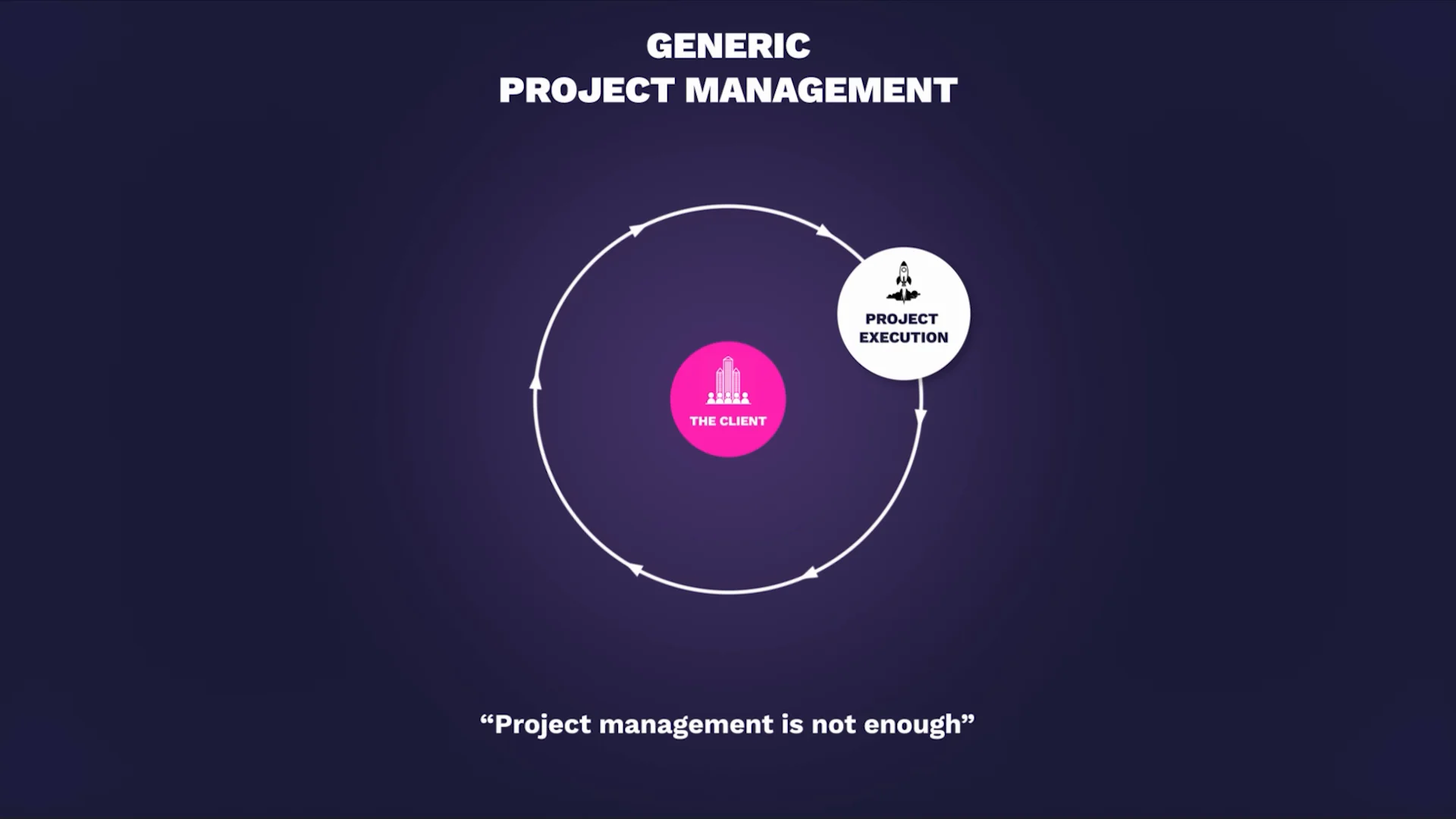
Teamwork.com has all of the client management features you need to provide an excellent experience at every stage of the journey (onboarding, planning, execution, delivery, support, renewal), empowering you to focus on work that drives real value for your clients (business outcomes, successful projects, strategic partnership) and business (profitability, efficiency, growth, repeat revenue).
Key features
Projects, milestones, tasks, and subtasks help you keep track of client work (organize by client, project, phase) and communicate in context with comments (feedback attached to specific tasks, not lost in email - @mention team members or clients for notifications, attach files for reference, thread conversations for history).
Time tracking lets you record and manage every billable and non-billable hour with timers (start/stop for active work), manual entries (add time after the fact), or timesheets (weekly grid). Categorize time as billable vs non-billable, set custom billing rates (by person, project, or task type), and compare actual hours vs estimated hours to improve scoping accuracy by 15-25% over time.
Teamwork Desk centralizes client requests and communication (support tickets, change requests, questions) for a more streamlined (all team members see all requests), consistent (any team member can respond with full context), and transparent experience (clients see ticket status, response times, resolution history). Prioritize requests from key clients, set SLAs (response time targets), and track support metrics (average response time, resolution time, client satisfaction).
Client users enables you to collaborate with clients in one shared workspace so they can review work (view projects, tasks, files), add feedback (comment on tasks, upload files, request changes), and approve deliverables (mark tasks complete, approve proofs) without needing to pay for more licenses (unlimited free client users - saves hundreds monthly vs per-seat pricing for every client contact).
Proofs lets you share deliverables (designs, documents, videos) and works-in-progress with clients, manage version histories (see all iterations, who uploaded when, what feedback was given), and track approvals from one dedicated hub (pending approvals highlighted, approved items ready for production). Visual markup (annotate designs with comments and arrows) and comparison view (see changes between versions side-by-side) streamline feedback cycles from 2-3 days to same-day approvals.
Templates turn your best successes into your future blueprints (save project structures with tasks, subtasks, dependencies, assignees, due date offsets), and are perfect for onboarding new clients quickly (spin up new client project in under 5 minutes vs 30-45 minutes manual setup) while still ensuring they get a five-star experience (consistent process, nothing forgotten, professional delivery).
)
Key insight: Client management software must combine CRM and project delivery
Most "client management" software is actually CRM software (HubSpot, Keap, Nimble) - tracks leads, sales pipeline, and contact information but lacks project management for delivering client work. You can track that you won the client, but not how to deliver their project. Conversely, project management software (Asana, Monday, Trello) handles delivery but lacks client-specific features (free client access, client portals, help desk, proofs). True client management software (Teamwork.com) combines both: CRM-lite features (client records, contact management, deal tracking) + robust project delivery (tasks, time, budgets, resources).
Trade-off: specialized tools (HubSpot for sales, Teamwork.com for delivery) do one thing deeply vs combined tools do both adequately.
Action: Choose based on your primary need - if you're generating leads and need sophisticated marketing automation, use HubSpot for sales + Teamwork.com for delivery (integrate them). If you're delivering client work and just need basic client tracking, Teamwork.com alone suffices.
Pricing
Free Forever: $0 (up to 5 users) - includes 2 projects, basic tasks, unlimited client users, 100 MB storage
Basics: £9.99/user/month (billed annually) – Focuses on project delivery and time tracking. Includes project health monitoring (planned vs. actuals), AI comment summarization, 5,000 automations, and integrations with Xero and other productivity tools.
Accelerate: £24.99/user/month (billed annually) – Adds unlimited projects, AI-powered capacity and utilization views, time budgets & retainers, smart-logic intake routing, and 20,000 automations. Includes Hubspot and Quickbooks integrations.
Optimize: Custom Pricing – Built for profitability and resource management. Adds AI smart-assignment, AI-driven profitability forecasting, financial/multi-currency budgets, 100,000 automations, and Salesforce/Netsuite integrations.
Enterprise: Custom Pricing – For complex organizations. Adds Single Sign-On (SSO), advanced security, a dedicated success manager, and expert implementation support.
Pricing accurate as of March 2026. Visit Teamwork.com pricing for the latest details and to start a free 30-day trial (no credit card required).
Ratings & reviews
G2 rating: 4.4/5 (based on 1,000+ reviews as of December 2025)
2. HubSpot
HubSpot is a customer relationship management (CRM) platform with marketing automation, sales pipeline, and service tools for managing the customer lifecycle. It's best for agencies (10-100+ people) focused on lead generation and sales who need sophisticated marketing automation. Pricing starts free (CRM, email tracking, 1 landing page), then $20/month for Marketing Hub Starter (1,000 contacts, email marketing), scaling to $890/month for Professional (2,000 contacts, automation, reporting) and $3,600/month for Enterprise (10,000 contacts, advanced features).
HubSpot is a customer relationship management (CRM) tool that can also be used to manage client relationships (track contacts, deals, communication history) but is not designed for delivering client work (lacks project management, task tracking, resource management, time tracking for billing). It works across marketing (lead generation, email campaigns, landing pages), sales (pipeline management, deal tracking, quotes), and customer service (ticketing, knowledge base, live chat) to help you deliver a unified, personalized customer experience from acquisition (attract leads, convert to customers) right through to ongoing support (help desk, account management). However, for agencies delivering client projects (campaigns, websites, creative work), HubSpot lacks essential features like project timelines, task dependencies, resource scheduling, time tracking for billing, and budget management - you'll need separate project management tools (Teamwork, Asana) to deliver the work.
Key features
Lead generation: Forms, landing pages, live chat, chatbots, email marketing for attracting and capturing leads. Track lead sources, conversion rates, and ROI by channel.
Marketing automation: Triggered email sequences, lead scoring, workflow automation based on contact behavior (form submission, email click, page visit). Nurture leads automatically without manual follow-up.
Sales pipeline management: Visual pipeline showing deals by stage (Lead, Qualified, Proposal, Negotiation, Closed Won/Lost), forecast revenue, track win rates. Manage sales process from first contact to closed deal.
Analytics and reporting: Track marketing performance (campaign ROI, lead sources, conversion rates), sales metrics (pipeline value, win rate, sales cycle length), and customer service (ticket volume, response time, satisfaction). Custom dashboards and reports.
AI-powered tools: AI chatbot for website visitors, AI content assistant for email copy, AI lead scoring for prioritization. Automate repetitive tasks and improve personalization.
Service Hub: Help desk ticketing, knowledge base, customer feedback surveys for ongoing support. Centralize customer service communications.
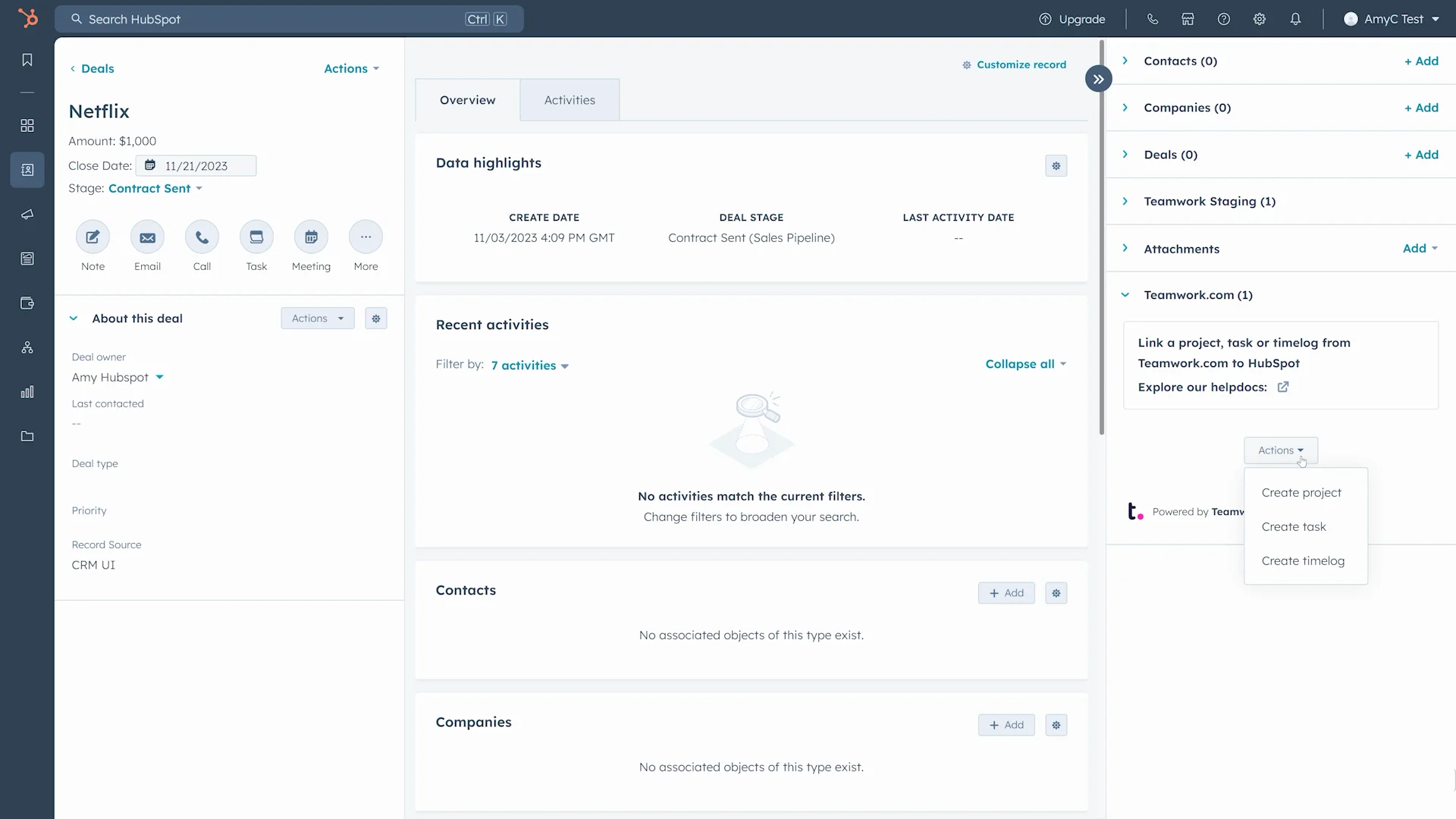
Pro tip: Already use HubSpot to attract and convert new clients? Use the Teamwork.com-HubSpot integration to sync your data and create seamless handovers from the sales team to the project team. Create projects, tasks, and log time in Teamwork.com right from HubSpot, and link project information to relevant deals, contracts, or campaigns in HubSpot. Leverage automations to take action when updates occur in HubSpot to remove manual admin and keep work flowing.
Transcript for the video 'Teamwork HubSpot App UPDATED':
With teamwork dot com's HubSpot app, you can automate tasks, streamline workflows, and keep your projects on track like never before. You can set up in either app. For teamwork dot com, navigate to my apps, search for HubSpot, click enable, and authorize the necessary permissions. Or for HubSpot, just navigate to the HubSpot ecosystem marketplace, search for teamwork, click install app, and authorize those necessary permissions. Now you're going to see the true power of workflows by teamwork dot com. So let's dive into some features. Using workflows, you can create teamwork dot com tasks, projects, or clients when updates occur in HubSpot. And don't forget about the enhanced team collaboration using CRM cards directly within HubSpot. This allows reps to create tasks and projects from HubSpot to help foster better communication across teams. Reps can also log time to teamwork dot com directly from within HubSpot and link this time to a specific client. Speaking of linking, you can link HubSpot deals, companies, tickets, and contacts to teamwork dot com projects, tasks, and log time. Using our automations, you can automatically create tasks and projects in teamwork dot com when deal stage changes in HubSpot. This means more consistency and less manual work to keep on top of client needs. Install teamwork dot com's HubSpot app today and take your productivity to the next level.
Pricing
Free - includes CRM, contact management, email tracking, 1 landing page, forms, live chat
Marketing Hub Starter: $20/month (1,000 marketing contacts) - adds email marketing, forms, landing pages, ad management
Marketing Hub Professional: $890/month (2,000 marketing contacts) - includes automation, A/B testing, custom reporting, omnichannel marketing
Marketing Hub Enterprise: $3,600/month (10,000 marketing contacts) - adds predictive lead scoring, custom objects, advanced permissions
Pricing accurate as of December 2025. HubSpot is modular - Marketing Hub, Sales Hub, Service Hub priced separately. Visit HubSpot pricing for current details.
Ratings & reviews
G2 rating: 4.4/5 (based on 10,000+ reviews as of December 2025)
3. Keap
Keap is a CRM and marketing automation platform with contact management, email sequences, and pipeline tracking for small businesses. It's best for solopreneurs and small teams (1-10 people) needing sales automation and client communication. Pricing starts at $249/month for Pro (2,500 contacts, 2 users, automation, landing pages), scaling to $399/month for Max (25,000 contacts, 3 users, advanced automation, sales pipeline).
Keap is a business automation and CRM software that can help small businesses manage their client relationships (track contacts, communication history, deals). It lets you organize all lead and client information in one place (centralized contact database) and use automations to trigger follow-ups, like emails (drip campaigns, nurture sequences) and text messages (SMS reminders, appointment confirmations), to boost conversions (turn leads into clients) and nurture relationships (stay top-of-mind, provide value). While it works as a client tracking software (record who your clients are, what you've sold them, communication history), it doesn't have any project management (tasks, timelines, dependencies) or resource management capabilities (capacity planning, utilization tracking, workload balancing) to help you execute client work - you'll need separate tools like Teamwork for delivery.
Key features
Automated lead capture: Web forms, landing pages, and integrations automatically add leads to Keap when they submit information. No manual data entry.
Lead and contact management: Centralized database of all leads and clients with contact information, communication history, tags, and custom fields. Segment by criteria for targeted outreach.
Email marketing: Create and send email campaigns, build automated drip sequences (welcome series, nurture campaigns), and track opens, clicks, and conversions. Personalize with merge tags.
Text (SMS) marketing: Send text messages for appointment reminders, follow-ups, or promotions. Automate SMS based on triggers (appointment booked, payment due, milestone reached).
Campaign automations: Build automated workflows triggered by contact behavior (form submission, email click, tag applied) with actions (send email, send SMS, assign task, update field, move to pipeline stage). Visual campaign builder.
Sales pipeline: Visual pipeline showing deals by stage with drag-and-drop. Track deal value, probability, expected close date. Forecast revenue and manage sales process.
Invoicing and payments: Create and send invoices, accept online payments via Keap Payments, track payment status. Automate invoice generation and payment reminders.
Pricing
Pro: $249/month (2,500 contacts, 2 users, billed annually) - includes automation, landing pages, sales pipeline, email marketing, text marketing
Max: $399/month (25,000 contacts, 3 users, billed annually) - adds advanced automation, lead scoring, promo codes, affiliate program management
Pricing accurate as of December 2025. Additional users cost extra. Visit Keap pricing for current details.
Ratings & reviews
G2 rating: 4.2/5 (based on 1,500+ reviews as of December 2025)
4. Semrush CRM
Semrush CRM is a client management tool for SEO agencies integrated with Semrush's SEO platform. It's best for SEO-focused agencies (5-30 people) already using Semrush who want client management connected to SEO data. Pricing is included with Semrush subscriptions ($129.95-$499.95/month depending on plan) - no separate CRM cost.
Semrush CRM is a client management solution aimed at online marketing agencies doing SEO work. It provides an integrated customer workflow for SEO teams and professionals working on search engine optimization, allowing you to create a connected view of your client that includes domain metadata (domain authority, backlinks, rankings), analytics and marketing tools (traffic data, keyword rankings, competitor analysis), social media links (social profiles and metrics), and contact information (client contacts, communication history). Sync Semrush projects and reports to the client view in Semrush CRM (SEO audit results, ranking reports, backlink analysis appear in client record), track metrics right from the client page (see current rankings, traffic trends, SEO health without leaving CRM), and share insights with dedicated client portals (white-label reports, client-facing dashboards). However, Semrush CRM lacks robust project management (basic task tracking only, no Gantt charts, no dependencies), resource management (no capacity planning or utilization tracking), time tracking (no billable hours tracking), or budget management (no profitability reports) - it's designed for tracking SEO client relationships and metrics, not delivering complex projects.
Key features
Semrush SEO integration: Connect client records to Semrush SEO projects (audits, keyword tracking, backlink monitoring, competitor analysis). See SEO metrics (rankings, traffic, domain authority) directly in client view without switching tools.
Unified client view: Centralized client profile showing contact information, domain data (SEO metrics, traffic, rankings), social profiles (Facebook, LinkedIn, Twitter links and follower counts), projects (linked Semrush SEO projects), and communication history. One place for all client context.
Basic task management: Create tasks, assign to team members, set due dates, track completion. Tasks are simple (no subtasks, no dependencies, no time tracking) - suitable for basic project coordination but not complex project delivery.
SEO reports: Generate and share SEO reports (ranking reports, audit reports, backlink reports, traffic reports) with clients. Schedule automated report delivery (weekly, monthly) and customize branding (white-label with agency logo and colors).
Client portal: Dedicated client-facing portal where clients can view their SEO metrics, reports, and project status without logging into Semrush directly. Provides transparency and reduces "how are we doing?" status update requests.
Pricing
Included with Semrush subscriptions - no separate CRM cost. Semrush pricing: $129.95/month (Pro), $249.95/month (Guru), $499.95/month (Business).
Pricing accurate as of December 2025. Semrush CRM is a feature within Semrush subscriptions, not standalone product. Visit Semrush pricing for current details.
Ratings & reviews
Semrush CRM reviews are included in overall Semrush product reviews. G2 rating for Semrush: 4.5/5 (based on 2,000+ reviews as of December 2025)
5. Nimble
Nimble is a relationship management platform with contact enrichment, social integration, and pipeline tracking for solopreneurs and networkers. It's best for individuals or small teams (1-10 people) focused on relationship building and networking. Pricing is $24.90/user/month for Nimble Business (all features, unlimited contacts, unlimited pipelines).
Nimble is a relationship manager for solopreneurs and business teams focused on networking and relationship building. It brings information together from contacts (email signatures, business cards), calendars (meetings and events), and emails (Gmail, Outlook integration), and automatically updates records so you don't have to (pulls contact info from email signatures, logs communication history from emails, syncs calendar events). It enriches your data by matching social profiles to contacts and companies (finds LinkedIn, Twitter, Facebook profiles automatically), and provides business insights like the number of employees, revenue, and industry (pulls from public databases), so you can personalize your outreach and communications (reference company news, congratulate on milestones, tailor messaging to industry). However, Nimble lacks project management (no tasks, timelines, or deliverables tracking), resource management (no capacity planning), time tracking (no billable hours), or budget management (no profitability) - it's designed for tracking relationships and sales, not delivering client projects.
Key features
Sales prospecting: Find and add prospects from LinkedIn, Twitter, or email. Browser extension lets you add contacts while browsing social profiles or company websites. Build targeted prospect lists for outreach.
Contact management: Centralized database of all contacts (leads, clients, partners) with communication history (emails, calls, meetings), tags (categorize by relationship type, industry, status), and custom fields (track any data point). Segment contacts for targeted communication.
Social and data enrichment: Automatically match social profiles (LinkedIn, Twitter, Facebook, Instagram) to contacts and pull business insights (company size, revenue, industry, location, tech stack) from public databases. Enrich contact records without manual research - saves 5-10 minutes per contact.
Group messaging and sequences: Send bulk emails to segments, create automated email sequences (drip campaigns, follow-up series), and track engagement (opens, clicks, replies). Personalize with merge tags (name, company, custom fields).
Workflow automation: Build simple automations triggered by contact actions (tag applied, email opened, deal stage changed) with actions (send email, create task, update field, add to list). Automate follow-ups and routine processes.
Sales reporting: Track pipeline metrics (deal value, win rate, sales cycle length), activity metrics (emails sent, calls made, meetings held), and relationship health (last contact date, engagement score). Custom reports and dashboards.
100+ integrations: Connect to Gmail, Outlook, Google Calendar, Mailchimp, Constant Contact, QuickBooks, Shopify, and 100+ other tools. Sync data and extend functionality.
Pricing
Nimble Business: $24.90/user/month (billed annually) - includes all features, unlimited contacts, unlimited pipelines, group messaging, social enrichment, integrations
Pricing accurate as of December 2025. 14-day free trial available. Visit Nimble pricing for current details.
Ratings & reviews
G2 rating: 4.5/5 (based on 1,000+ reviews as of December 2025)
How to choose the right client management software
Choosing the right client management software depends on your primary need: managing client relationships and sales (CRM focus) or delivering client work (project management focus). If your main challenge is generating leads, tracking sales pipeline, and converting prospects to clients, choose CRM-focused tools like HubSpot ($20-$890/month with sophisticated marketing automation), Keap ($249-$399/month for small business), or Nimble ($24.90/user/month for relationship tracking). If your main challenge is delivering client projects, tracking time for billing, managing resources across clients, and proving profitability, choose project-focused tools like Teamwork.com ($10.99-$54.99/user/month with comprehensive project delivery features).
Most client services teams need both - CRM for sales and project management for delivery. Options:
Use HubSpot for sales + Teamwork.com for delivery (integrate them with HubSpot-Teamwork.com integration to sync deals to projects).
Use Teamwork.com for both (includes basic CRM features like client records and deal tracking plus robust project management - simpler but less sophisticated on sales side).
Use specialized tools for each (CRM for sales, project management for delivery, accounting for billing - best-of-breed but requires integration management).
Start with a 14-30 day trial (most tools offer free trials), test with 2-3 real client scenarios (onboard new client, deliver project, track communication), and measure adoption (percentage of team using daily), time saved (hours saved weekly on coordination), and client satisfaction (NPS scores, feedback). If the tool doesn't achieve 80%+ adoption or measurably improve client experience within 30 days, it's not the right fit.
Key insight: Don't confuse CRM with client management for project delivery
CRM software (HubSpot, Keap, Nimble, Salesforce) tracks client relationships - who they are, what you've sold them, communication history, sales pipeline. Client management software for agencies (Teamwork.com) manages client work delivery - projects, tasks, time, budgets, resources, deliverables. The confusion: "client management" can mean either relationship tracking (CRM) or work delivery (project management with client features). Most agencies need both but they're different tools solving different problems.
Trade-off: specialized CRM (HubSpot) does sales deeply but can't deliver projects vs integrated client work platform (Teamwork.com) delivers projects deeply but has lighter CRM features.
Action: Clarify your primary need - if you're generating leads and need sophisticated marketing automation, invest in CRM (HubSpot) + project management (Teamwork.com). If you're delivering client work and just need basic client tracking, Teamwork.com alone suffices with its client user and project management features.
Impress your clients with Teamwork.com’s client management system
While most client management software focuses on simply creating a record of the client relationship (CRM tracking contacts, deals, communication), Teamwork.com combines robust client operations (unlimited free client access, proofs hub for approvals, help desk for support, client portals for visibility) with powerful project management (tasks, timelines, resources, budgets, time tracking, profitability reporting) to meet the unique challenges that agencies face - delivering profitable client work while maintaining strong relationships. Manage your clients and your work from one central place to enhance team efficiency (reduce coordination overhead from 40% to 15% of time), collaborate more effectively (clients see progress without constant status requests), and build stronger client relationships (transparency, responsiveness, quality delivery) that grow your business and your revenue (repeat work, referrals, upsells).
Start your free 30-day trial (no credit card required) or book a demo to see how Teamwork.com's client management can transform your operations.

Client management software - FAQs:
What is the best way to keep track of clients?
The best way to keep track of clients depends on what you need to track - relationships and sales (CRM like HubSpot, Keap, Nimble) or project delivery (client work platform like Teamwork). For agencies delivering client projects, the best approach is purpose-built client management software that combines client operations (communication, collaboration, visibility) with project management (tasks, time, budgets, resources). The best client management software lets you manage (organize client information, projects, communication), monitor (track project progress, budget status, team workload), and grow your client relationships (deliver quality work, provide transparency, build trust) from one central place, and gives you the tools to plan and deliver work across your entire client roster (5-50+ clients) so you can collaborate more effectively (shared workspace, real-time updates, contextual communication) without chaos or tool sprawl.
What are the benefits of client management software for agencies?
Some of the benefits of client management software that agencies can expect include:
Simplified project management and planning - see all client work in one dashboard, balance resources across clients, identify conflicts before they cause delays
Centralized client communications - all feedback, approvals, and updates in shared workspace (not scattered across individual email inboxes) - reduces "where's that email?" time by 70-80%
Streamlined project scheduling and delivery - visual timelines, automatic conflict detection, drag-and-drop rescheduling - improves on-time delivery from 70% to 90%+
Improved data collection and insights - track time, budgets, profitability by client or project - identify profitable vs unprofitable work, improve estimates by 15-25%
Stronger client relationships - transparency (clients see progress), responsiveness (faster feedback cycles), quality (balanced team workloads prevent rushed work) - improves client retention by 20-30%
Reduced manual admin - automations and templates save 5-10 hours weekly per person on repetitive tasks (project setup, status updates, invoice generation)
All of these benefits lead to improved efficiency (25% more time for billable work), time and cost savings (10-15 hours weekly saved on coordination = $300-$750/week at $30-$50/hour rates), and happier clients (higher NPS scores, more referrals, increased repeat business).
What are the different types of client management systems?
Client management systems can include customer relationship management (CRM) tools (HubSpot, Salesforce, Keap - track leads, contacts, deals, sales pipeline), sales pipeline management tools (Pipedrive, Close - focus on sales process and deal tracking), marketing automation tools (Marketo, Mailchimp, ActiveCampaign - email campaigns, lead nurturing, automation), and project management tools with client features (Teamwork, Wrike - deliver client projects with collaboration, time tracking, budgets). The most effective client management systems for agencies combine client management (such as communication and collaboration features - client access, proofs, help desk, portals) with project management capabilities (like project tracking, resource management, time tracking, budget management), helping you work together in context (shared workspace, contextual communication, integrated workflows) to deliver work they love (quality, on-time, transparent) in a profitable and efficient way (track time for billing, manage budgets for profitability, balance resources for optimal utilization).
What is the best client management tool for agencies?
Teamwork.com is the only platform built specifically for managing client projects (not just client relationships), combining client operations (unlimited free client access, proofs for approvals, help desk for support, client portals for visibility) and project management (tasks, timelines, resources, budgets, time tracking, profitability reporting) in one streamlined, powerful tool. Obviously, we're a little biased - but don't just take our word for it. Read over 1,000 glowing reviews on G2 (4.4/5 rating) or hear directly from our happy customers like Liberty Marketing, IDEA PLANET, and Strencom who've improved efficiency, profitability, and client satisfaction using Teamwork.com.
For agencies delivering client projects (not just tracking relationships), Teamwork.com provides features essential for profitability that CRM tools lack: time tracking for billing, budget management for profitability, resource management for capacity planning, and unlimited free client access for collaboration. If you're doing client work, Teamwork.com is purpose-built for your needs.
More client management resources:
)
)
)
)
)
)
)
)