Transcript for the video 'How Do I Track Contracts and Other Project Records with Custom Items in Teamwork.com?':
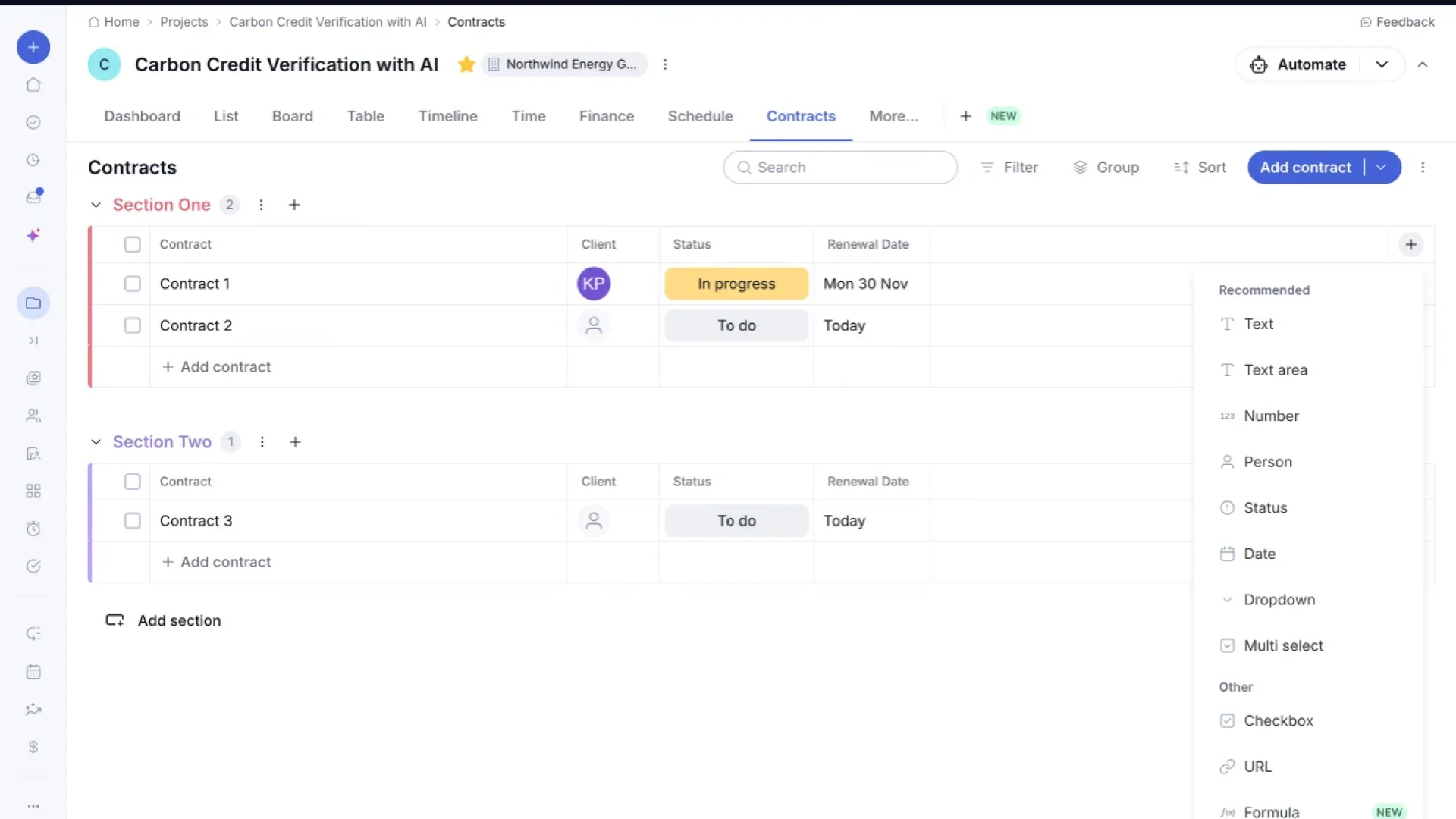
Today, I'm going to show you how to add custom items to your projects. First things first, we need to create a new custom item. I'll click this plus icon here to kick off that process. Now we'll give this tracker a name so it's clear what it's for. Let's call it contracts since that's exactly what we'll be managing here. You can see a preview of the layout on the right giving us a sense of what fields we'll be working with. I'll click create to bring this contracts tracker to life. And here's our brand new contracts tracker. You define the layout using sections and fields so you can build simple tables that match your real workflows. You can edit each column to choose a client, what the status of this contract is, and renewal dates. Sections are a great way to keep contracts organized. You can customize the names of each section and contract as needed. If we wanna capture more information about our contracts, we can add new columns. From here, you can pick exactly the kind of data you want to track, whether that's plain text, a number, a person, or even a status field. If you're ever looking for a specific contract, this search bar makes it quick and easy to find it by name. Filtering is another handy tool here. Clicking filter lets us narrow the list down based on specific criteria. We can also group contracts together. Clicking group lets us organize entries by section or by any other field we choose. And if ordering matters, sort lets us arrange the contracts list in whatever sequence makes the most sense. Just like with filtering, you can choose the exact field to sort by, client, status, or renewal date, whatever fits your workflow best. There's also a broader options menu available here, giving us access to some additional list wide actions. Adding new contracts is just as simple. Clicking this drop down arrow next to add contract also gives us the option to add a whole new section. From here, I can just type in a name to add a brand new contract straight into the tracker. And that's it. Replace scattered spreadsheets by tracking key project information directly in Teamwork where it's easy to organize, update, and collaborate.
)
Goodbye spreadsheets. Track vendor records and equipment logs in your projects.
Custom Items give all your work a home inside Teamwork.com.
Build a table that matches how your team actually operates, add the fields you need, and keep it next to the tasks and budgets it's connected to instead of in a spreadsheet only one person can find, a doc that goes stale, or a tool nobody remembers to check.
Built for your workflow
A contract, a checklist, and a vendor file don't fit a generic task list, but that doesn't mean starting from scratch for each one. Set up the fields once, and reuse that same starting point for whatever you track next.
Define the tabs, sections and fields that match your process
Duplicate it for anything else you want to track
One structure for contracts, NDAs, onboarding, maintenance logs, whatever you need
)
One system of record
Open access means five versions of the same file floating around, and no way to know which one's current. One structure, one place to update it, clean view-only access for anyone else who needs to see it. Finally, a version everyone can trust.
Admins set the structure, so it stays consistent no matter who’s using it
Standard users add and edit, clients and collaborators see view-only
One source of truth instead of a spreadsheet only one person maintains
)
Views that work the way you do
A shared table shouldn't mean a shared view. Set your filters and sort how you like them, and they shouldn't disappear the moment a teammate changes theirs.
Sort, filter and group by any field you've created
Edit inline and update several records at once
View preferences save per person, so nobody resets your setup
)
What teams actually build with Custom Items

Consulting
Track SOWs, deliverables, and client-specific requirements against the engagement they're tied to, not in a separate tracker your team has to remember to update.

IT Services
Keep change requests, asset records, and vendor details organized project by project, so nothing gets managed outside the work it's actually part of.

Agencies
Manage campaign briefs, creative requests, and vendor contracts alongside the client work driving them, in the same project your team is already using.

Implementation teams
Turn onboarding and rollout plans into a repeatable checklist you can duplicate across clients, instead of rebuilding it in a spreadsheet every time.
)